
Introducing Load Hub: One Search for Every Board
Load Hub searches 15+ load boards and broker portals from one place, ranks results for your truck, and pushes alerts the second freight matches.
Product
Introducing Load Hub: One Search for Every Board
Ask any dispatcher how many browser tabs they have open right now. The honest answer is too many. DAT in one window, Truckstop in another, the RXO portal, J.B. Hunt 360, C.H. Robinson Navisphere, plus a handful of broker logins that each want their own password and present the same load in a slightly different format. Covering a truck means hopping between all of them, re-typing the same lane, and hoping nobody booked the good load while you were on the wrong tab.
Today we are launching Load Hub to end that. Load Hub is one search surface across 15+ load boards and broker portals. You run a single query, and it returns every matching load from every connected source, normalized into one list and ranked for the specific truck you are trying to cover. Pair it with Load Radar and the loads come to you the moment they post. This is the search layer freight dispatch should have had years ago.
The problem is fragmentation, not freight
There is no shortage of freight to look at. The DAT network alone moves more than 500,000 loads a day against 1.7 million trucks, and the brokered market runs through roughly 27,000 licensed brokers, each with its own portal, its own posting rhythm, and its own idea of how a load should be displayed. The problem was never finding a place to look. The problem is that the freight relevant to one truck is scattered across a dozen of those places at once, and no single window shows all of it.
That scatter is expensive in ways that do not show up on an invoice. The same truck gets evaluated completely differently depending on which board happened to be open, how recently it was refreshed, and whether the dispatcher remembered to check a particular broker portal at all. A strong lane on one board may have a better-paying version sitting on another that nobody opened. High-demand lanes book in seconds, so the dispatcher watching three tabs loses to the one watching the right tab at the right moment. None of this is a skill problem. It is a tooling problem, and it compounds across every truck in the fleet.
It hits small carriers hardest, which is most of the market. There are roughly 787,000 active carriers on file with the FMCSA, and the overwhelming majority, about 91.5 percent, run ten trucks or fewer. Those are the operations where one or two dispatchers cover the whole board by hand, where deadhead routinely eats 15 to 30 percent of the miles, and where there is no spare headcount to brute-force the search by keeping more tabs open. When your margin lives in the gap between a good load and the first available load, the cost of looking in the wrong place first is real money.
What Load Hub does
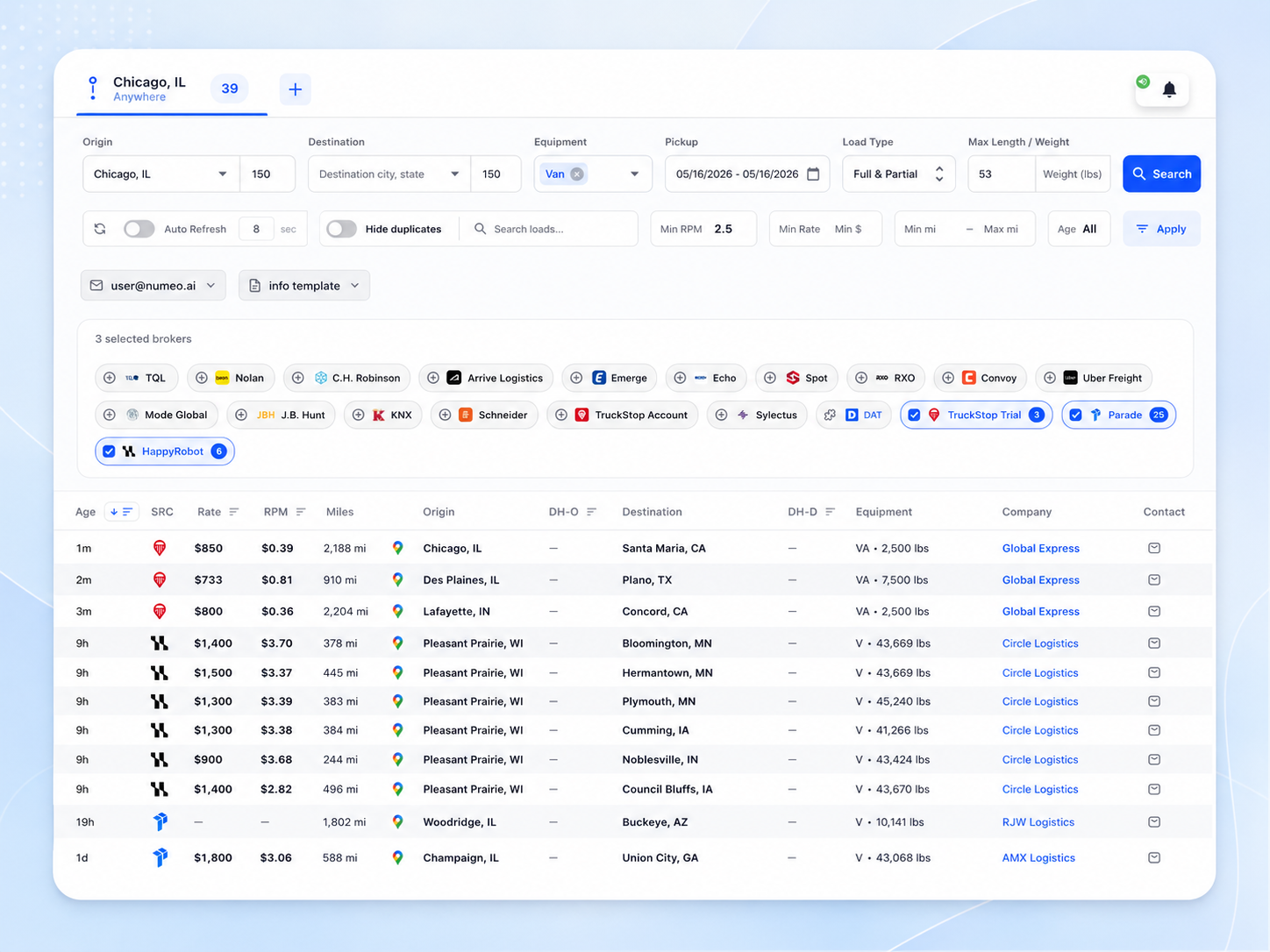
Load Hub collapses that fragmented search into one query. You connect the load board and broker accounts you already pay for, then search once. Behind the scenes, Load Hub fires that query at every connected source in parallel and pulls the results back into a single, normalized list, so a DAT load and an RXO load and a C.H. Robinson load sit side by side in the same format instead of in five different layouts across five different tabs.
It is built around the variables that actually decide whether a load is bookable, not just a keyword box. You filter by equipment type, including van, reefer, flatbed, and partial or full loads. You filter by origin and destination lane, by minimum rate or rate per mile, by mileage, and by deadhead tolerance measured from where the truck is now or where it is headed next. These are not decorative filters bolted onto a search bar. They are the dispatch logic itself, and an aggregator that drops them creates more work, not less. Load Hub keeps every one of those details intact across every source it touches.
Then it ranks. Instead of handing back a raw dump sorted by post time, Load Hub orders the combined results by profitability for your specific truck, weighing the rate offered both as a total and per mile, the load mileage, the deadhead distance, equipment compatibility, and how well the lane fits. A high gross rate hiding a long deadhead drops down the list where it belongs. A clean lane that fits the driver's hours rises. The dispatcher opens one view and sees the best real options first, already compared on the terms that matter.
Load Radar turns search into a standing watch
Searching is the floor. The loads that pay best on hot lanes are gone within seconds of posting, and you cannot beat that by refreshing a page faster. So Load Hub works alongside Load Radar, which takes your saved searches and watches every connected board and broker portal continuously, then pushes you an alert the instant a load matches your criteria.
That changes the rhythm of the day. Instead of a dispatcher sitting on a screen hitting refresh, the system holds the watch and taps you on the shoulder only when something worth covering actually appears. You stop being reactive to a wall of stale postings and start being first to the fresh ones. For a small team, that is the difference between chasing the board and getting a genuine head start on it, across every source at once rather than the one or two you had time to babysit.
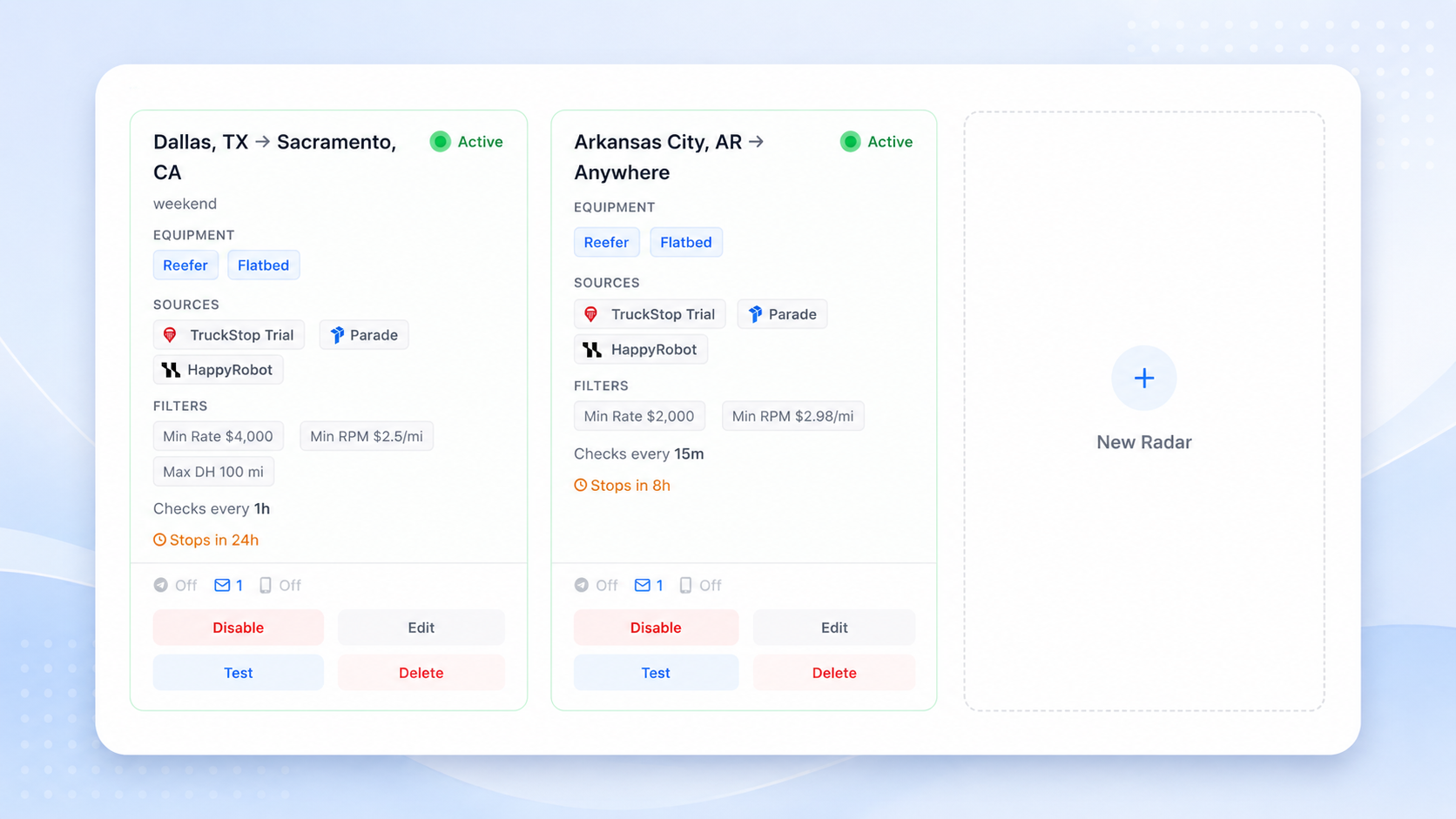
The two pieces fit together cleanly. Load Hub is the pull: run a query, see everything, compare, decide. Load Radar is the push: define what good looks like, then let it find that load for you the moment it exists. Together they cover both halves of how dispatchers actually work a board, the deliberate search and the constant standing watch, without asking anyone to keep a dozen logins open all day.
You stay in control
Load Hub is a productivity layer, not an autopilot. It does not replace your accounts and it does not take the wheel. You connect the load board and broker portal credentials you already hold, and Load Hub queries each source as you, respecting your existing subscriptions and your negotiated rates. Your accounts stay yours. You can connect a new source or disconnect one whenever you want, and your underlying subscriptions and relationships are untouched.
Just as important, every decision stays with the dispatcher. You define the search criteria and the filters. You review the ranked results and choose which loads to pursue. Booking happens the way it always has, through the original load board or broker portal on your own credentials, because Load Hub does not book loads for you. It does not negotiate rates either. When it is time to talk to a broker, that conversation is still yours to have, directly. Load Hub's job is to make sure that by the time you pick up the phone, you are working the best option from the entire connected market, not just whichever tab happened to be on top.
That boundary is deliberate. Aggregating search and ranking results is where a tool can take real work off a dispatcher's plate without taking away the judgment that makes a good dispatcher good. So Load Hub handles the part that is tedious and mechanical, the finding and the comparing across fifteen-plus places at once, and leaves the part that requires a human, the selecting and the negotiating, exactly where it belongs.
A different shape to the day
Put the pieces together and the workday changes shape. A truck comes empty. Instead of opening six tabs and running the same lane six times, the dispatcher runs one search in Load Hub, sees the whole connected universe of loads ranked for that exact truck, and has Load Radar already watching the lanes that matter for the next opening. The deadhead is visible up front instead of discovered after the fact. The better-paying version of a lane surfaces instead of hiding on a board nobody opened. The dispatcher spends their time deciding and negotiating, not hunting and re-typing.
That is the bet behind Load Hub. Dispatchers are not slow because they lack effort or places to look. They are slowed by a search that is spread across too many windows, none of which talk to each other. Bring that search into one surface, normalize it, rank it for the actual truck, and put a watch on top of it, and the same team covers more trucks at better rates with less friction. Load Hub is available now, and there is a 14-day free trial so you can run it against your own lanes before you commit.
Start here: Load Hub.
Try Numeo
Ready to find better loads?
Numeo automates load search, rate negotiation, and broker emails — so you spend more time moving freight.
Explore Numeo
Related posts
Load Radar: Load Hub Alerts When Freight Posts
Load Radar is the Load Hub feature that watches your lanes across connected boards and alerts you the second a matching load posts.
May 21, 2026 · 7 min read
GuidesIs AI Dispatch Worth It for Small Carriers?
A straight answer for carriers with 1 to 10 trucks: when AI dispatch actually earns its keep, and when you are better off skipping it.
Mar 24, 2026 · 7 min read
GuidesIs RPM Enough? How to Evaluate a Load Beyond Rate Per Mile
Rate per mile is one input, not the answer. A real checklist for evaluating a load beyond RPM: all-in rate, detention, lane strength, broker pay.
Mar 5, 2026 · 9 min read